Virtual Clothes Try-On
See a specific outfit on your photo. Add one person image and one clothing reference, then review your AI-generated preview.
Try on your clothing reference
Upload one person photo and one clothing reference. Add optional instructions for details.
Advanced settings: Nano Banana 2, 3 credits, 1K
Output aspect ratio
Drop person photo here
- or -
Click to Upload
Drop clothing reference photo here
- or -
Click to Upload
One clothing photo per generation. A flat lay or clear model photo works best.
No result yet. Upload your images and click Generate to see the edited photo.
Sign-in required. This model uses 3 credits per image. Resolution depends on the model and aspect ratio. Credit and download details
From clothing reference to outfit preview
Use this workflow when you already have a garment or outfit to try. A clear reference gives the model a visual direction; it does not guarantee identical branding, texture or tailoring.
- 01
Choose a person photo
Start with one person facing the camera in good light. Keep the relevant body area visible and avoid poses where hands or objects cover the clothes. Use a photo you have permission to edit.
- 02
Add one clothing reference
Upload one flat lay or a clear photo of the outfit on a model. Keep the garment visible and the background simple. For multiple pieces, use one reference showing the complete outfit.
- 03
Generate and inspect
Check the credit cost, sign in, and generate. Compare the result with your reference, including fabric edges and patterns. Add a short instruction if a specific detail needs attention.
Check the person and garment details
This existing gallery example illustrates an outfit edit. When reviewing your own result, check the face, hands, garment edges, pattern and background. AI can change small details or invent fabric folds. A convincing picture does not establish the correct clothing size or guarantee an exact product match.
For a clearer reference, use one garment or one complete outfit in good light. Avoid collages, cropped hems and hands covering the fabric. If the result misses a detail, simplify the input and describe the detail explicitly.
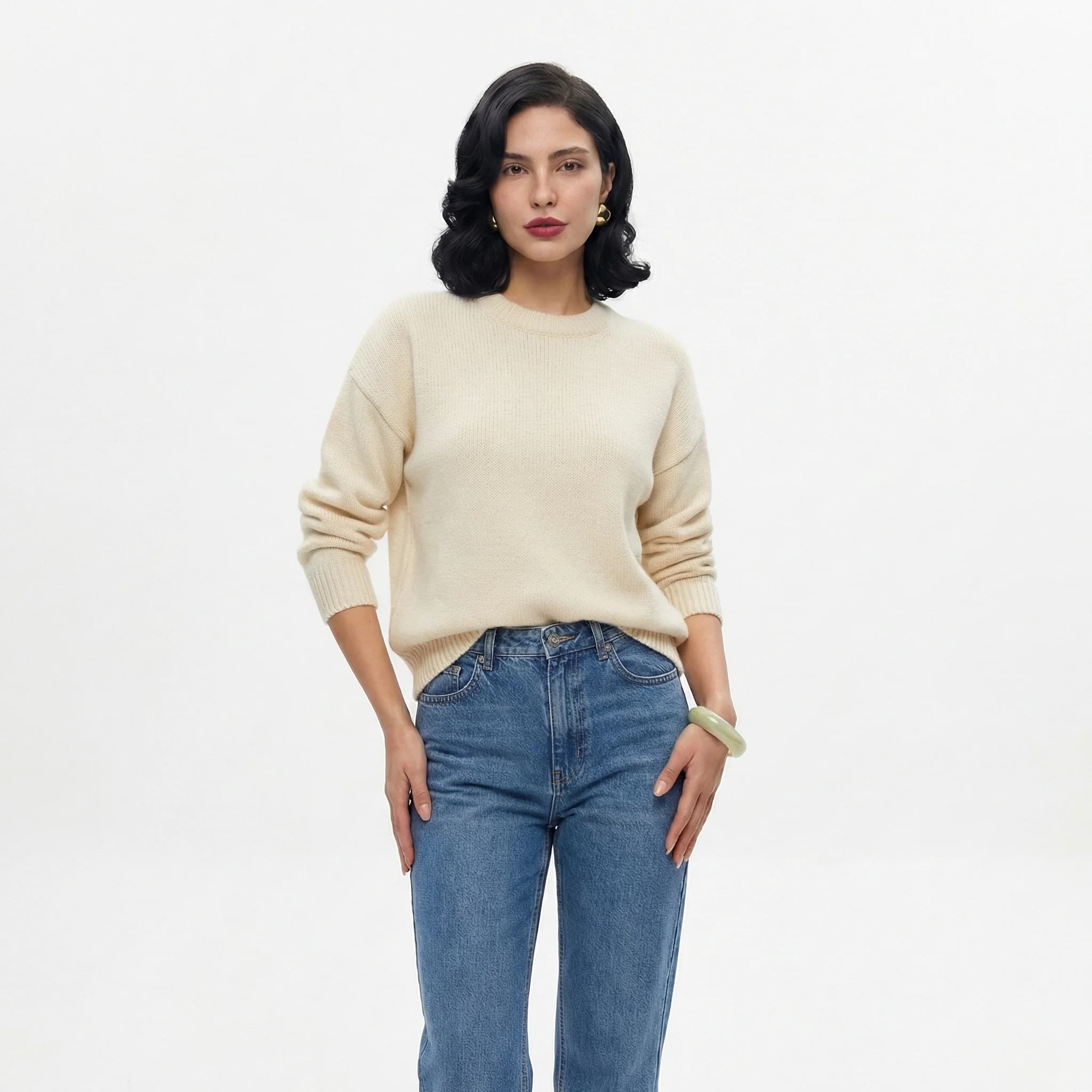
Original photo
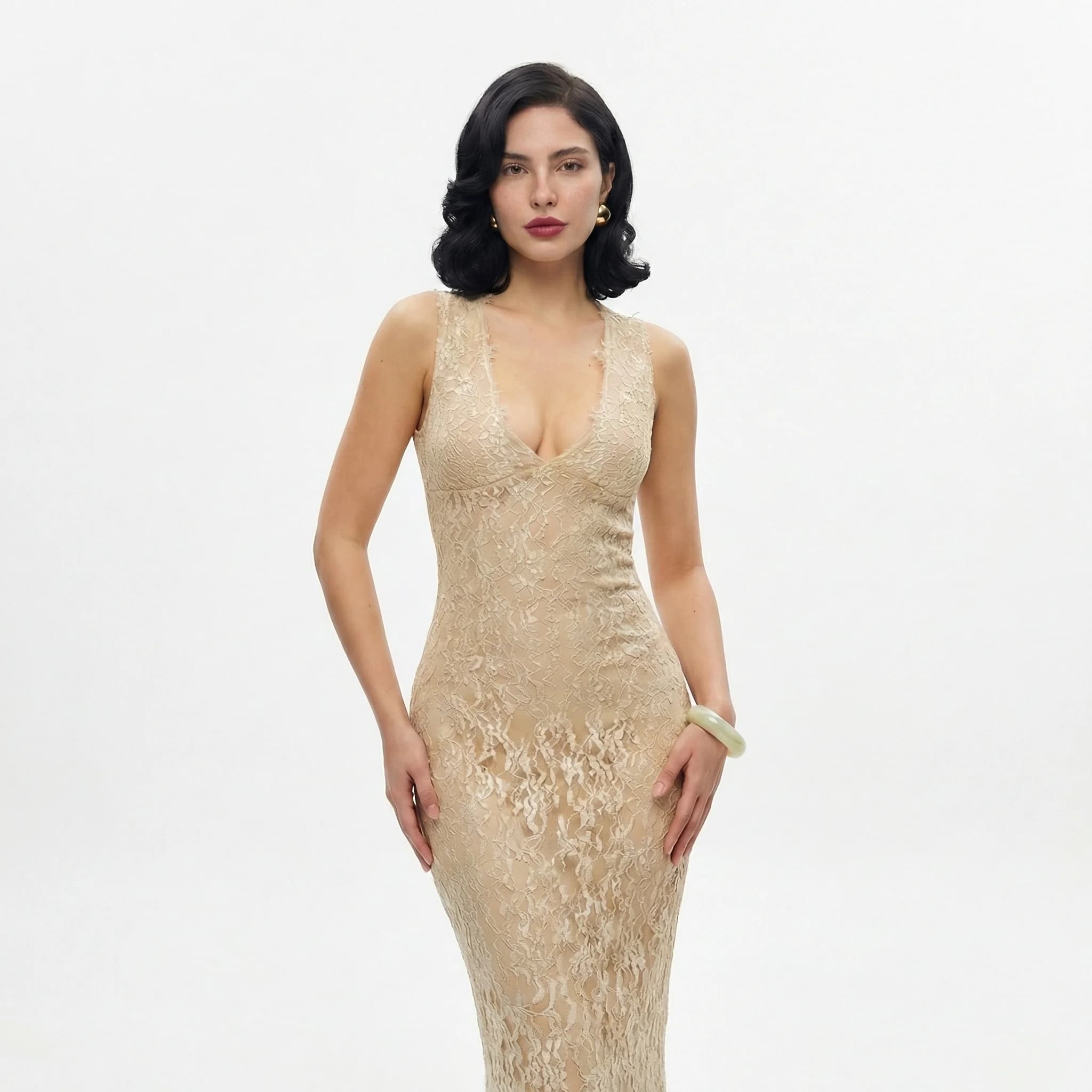
Gallery outfit edit
Credits, login and downloads
Know what is included before you upload.
- Credit balance
- Generation requires credits. Sign in to check your balance and purchase a credit plan if needed.
- Account required
- You can explore examples before signing in. An account and enough credits are required to generate your own image.
- Watermark
- AI Clothes Changer does not add a visible watermark when downloading the returned image. Provider-generated marks, if present, are not removed.
- Output resolution
- Nano Banana 2: 3 credits, 1K output; Nano Banana Pro: 8 credits, 2K output; GPT Image 2.5 Flare: 2 credits, 1K output; Flux 2 Pro: 2 credits, 1K output; Seedream 5.0 Pro: 8 credits, 2K output. Actual pixel dimensions depend on aspect ratio. This is a visual preview, not a size or fit measurement.
- Credit usage
- Generation costs depend on the selected model. Each new generation uses credits. A paid plan adds credits; check Pricing for its expiry and usage terms.
Questions about clothing references
Can the clothing reference show another person?
You can supply a clear model photo as the clothing reference. The workflow asks the AI to replace the clothing on your person photo using that reference. Results vary, so inspect both identity and garment details before using the image.
Does this swap two people’s outfits at once?
No. One generation edits one person photo using one clothing reference. It does not automatically create a second image with the outfits exchanged in the other direction.
Why did the pattern or logo change?
AI generates new image details and can reinterpret patterns, lettering, logos and fabric folds. Try a closer, clearer reference and explain the important detail. Exact reproduction is not guaranteed.
Can I try a new style without a clothing photo?
Yes. Select Describe a new outfit in the tool and enter a written description. That mode uses your person image and prompt without the clothing reference.
Can I use this to choose a size?
Use the image to explore appearance, not to determine sizing. Check the retailer’s measurements and fit guidance separately.
Can I try on clothes online without installing an app?
Yes. Upload a person photo and a clothing reference in your browser. Sign in and check your balance before generating. Both desktop and mobile browsers can use the tool.
How is this different from Google Shopping try-on?
Google Shopping offers try-on for eligible product listings using your photo. Here you supply the clothing reference yourself. Both generate visual previews; neither preview establishes the correct clothing size.
Is this connected to Amazon virtual try-on?
No. This is an independent image-editing tool. Amazon documents virtual try-on for selected shoes, eyewear and beauty products in its own shopping experience. Here you upload your own person and clothing references.
What does an outfit preview cost?
An account and sufficient credits are required. Model costs and output settings are listed above and beside the generation controls. Sample inputs can be loaded before sign-in; generating them uses credits just like your own photos.
Browser outfit previews and shopping try-on tools
Choose a workflow based on where your clothing reference comes from. Shopping tools work within their supported product experience; this tool accepts a reference image that you upload.
| Tool | Starting point | What to expect |
|---|---|---|
| AI Clothes Changer | Your person photo + your clothing reference | Independent outfit preview. Sign-in and credits required. |
| Google Shopping | Your photo + an eligible product listing | Look for the Try it on option. Product and regional availability vary. |
| Amazon | Supported products within Amazon’s shopping experience | Amazon documents virtual try-on for selected shoes, eyewear and beauty products. |
These tools are not affiliated. Visual previews do not establish garment sizing or exact fit. Check the retailer’s measurements separately.
Have a clothing photo ready?
Start with one clear reference and review the result before sharing.